Replacing the Excel maintenance list: what matters when you switch
Clarify the state of your data, import with a preview, undo mistakes, complete the record on site and know the full export: five points for switching from Excel.
Hoang Nguyen · 27 September 2026 · 6 min read
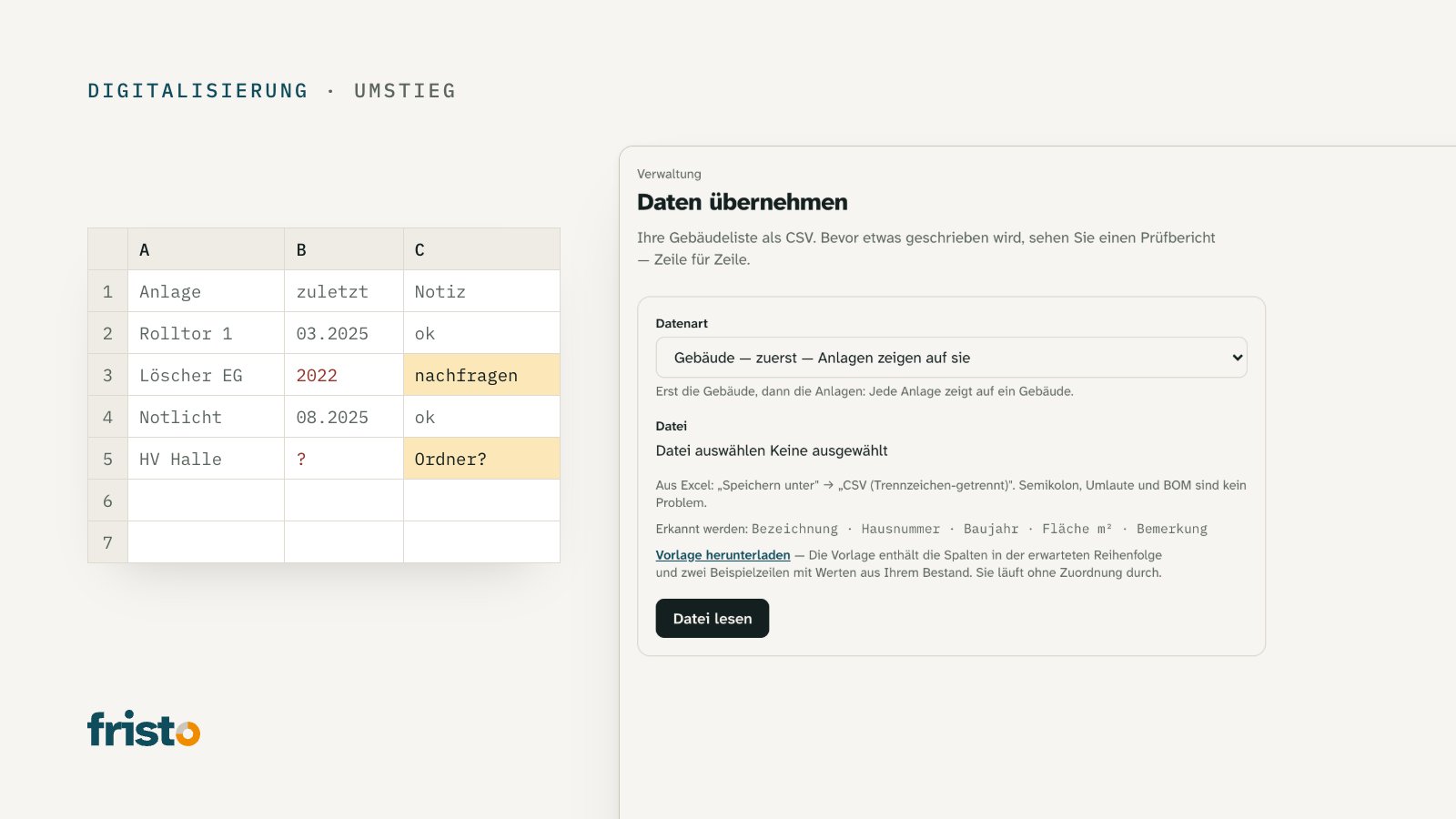
The file is called "Wartung_2019_final_v3.xlsx". It has 14 columns and 183 rows, three colours and a tab called "alt" that nobody dares to delete. Yellow means "check first", or so people seem to remember. The person who created the list left two years ago. Since then two people have taken turns adding entries, and who has the current version usually only becomes clear once both have changed something.
In many organisations, this is what the overview of maintenance and inspections looks like. It works as long as nothing out of the ordinary happens. And it is often the starting point when an organisation switches to a system.
This article shows what matters when you switch: clarify the state of your data, import with a preview, be able to undo a mistake, complete on site what is missing from the list — and know how to get the data back out again.
Where the list reaches its limits
A spreadsheet can do a lot, but there are four things it cannot do:
- Remind: It does not alert you when a deadline is getting closer. Someone has to open it and read it.
- Keep a history: Whoever enters the latest inspection usually overwrites the one before. After three years the list only knows what happened most recently.
- Provide evidence: The inspection report is somewhere else — in a folder, in a mailbox, with the service provider.
- Support several people: Two copies, two versions of the truth.
Yet the list is often more than an aide-mémoire. For work equipment such as ladders, doors and forklifts, the Ordinance on the Prevention of Accidents and Occupational Diseases requires maintenance to be documented (VUV Art. 32b); for fire protection equipment, Fire Protection Guideline 12-15 requires it. A list that overwrites its own past only half meets that requirement.
Before switching: clarify the state of your data
A typical mistake when switching is to copy an unclear list unchanged into a new system. Afterwards the lack of clarity is just better formatted. Answer four questions first:
- Which version applies? Set a cut-off date and declare one file to be the authoritative one. From then on, all the others are no longer edited.
- One row, one asset? Rows such as "Fire extinguishers ground floor–3rd floor (12 pcs)" are either split up or deliberately kept as a single item with a quantity.
- Are the locations right? Building and room are in separate columns, using the same names as in everyday use.
- What is known, what is guessed? A missing inspection date stays empty or is flagged. An invented date is worse than none: it creates a deadline that has nothing to do with reality.
Also look for duplicate entries. The same asset often appears twice in the list — once under the manufacturer's name, once under its location.
Import with a preview
Many things can go wrong at once during an import. The "Standort" column ends up in the "Bemerkung" field, 03.04. becomes 4 March, and umlauts turn into question marks. A good tool therefore writes nothing until you have seen what will happen:
- It suggests which column in your file belongs to which field, and shows sample rows.
- It does a trial run and gives the result for each row: fine, with a note or skipped — and why.
- It states the number before you confirm: "Import 183 rows" is a statement you can check.
The order matters too. Buildings come first, then assets, because every asset must be able to point to a building.
An import must be reversible
Even with a preview it happens: the wrong file was selected, or a column was mapped wrongly, and the error only comes to light the next day. Then you need a way back that does not mean "delete everything by hand".
A clean undo removes what the import created — but only what nothing else depends on. If a QR sticker has already been printed or a work order recorded for an imported asset, it stays, and the system says why. Otherwise the work done since then disappears along with the error.
Complete on site what is missing from the list
No list is complete. The emergency light in the cellar, the compressed-air tank behind the workshop, the fall protection on the roof — they are missing because they never caused problems. That is why every switch should include a walk-round:
- Go through room by room, with the imported list in hand or on your phone.
- Record missing assets directly, with a photo of the rating plate.
- Mark assets that no longer exist as decommissioned instead of deleting them — their history remains as evidence.
- Label each asset unambiguously, for example with a QR sticker, so that the list and reality match up.
The article Einen Prüfplan für die eigenen Liegenschaften aufbauen describes how to turn the complete inventory into a deadline list.
Know the way out before you go in
Many people only ask one question of a new system when they next switch: how does the data get out again? The answer belongs before the decision. Look out for three points:
- Complete: all the data, not just a selection — plus the documents and photos in their original form.
- Readable: in an open format such as CSV, which any spreadsheet application can open.
- Any time: without a request to the provider, and even after termination.
An export is also useful during day-to-day operation: as a backup before a major clean-up, as a basis for your own analysis or as a document for a successor. So do not try it out only when you switch, but straight after going live — and check that everything is really in it.
Rule of thumb: Clarify the state of your data first, then import — with a preview, with a way back and with a walk-round for what appears in no list. And before you get in: know how you can get out again.
The references to regulations in this article are general information and not legal advice. In individual cases, the regulations of the canton and the requirements of the competent authority apply.
How Fristo helps
Under "Daten übernehmen" you import buildings and then assets as CSV, as Excel produces it with "Save as". Fristo suggests the column mapping and shows a row-by-row check report before anything is written; every import can be undone, provided nothing depends on it yet. You enter the date of the last inspection when adopting an inspection template, and the data export delivers all data as CSV with all files at any time — even after termination.
Sources
- Verordnung über die Verhütung von Unfällen und Berufskrankheiten (VUV), SR 832.30, Art. 32b — Federal Chancellery, Fedlex: fedlex.admin.ch/eli/cc/1983/1968_1968_1968/de
- Brandschutzrichtlinie 12-15 "Brandverhütung und organisatorischer Brandschutz", Ziff. 4.2 — Vereinigung Kantonaler Feuerversicherungen VKF: bsvonline.ch