Reporting faults by QR code: how a report becomes a work order
Whoever spots a fault rarely has an account. Why the barrier to reporting must be zero, and how a report turns into a completed work order.
Hoang Nguyen · 19 October 2026 · 6 min read
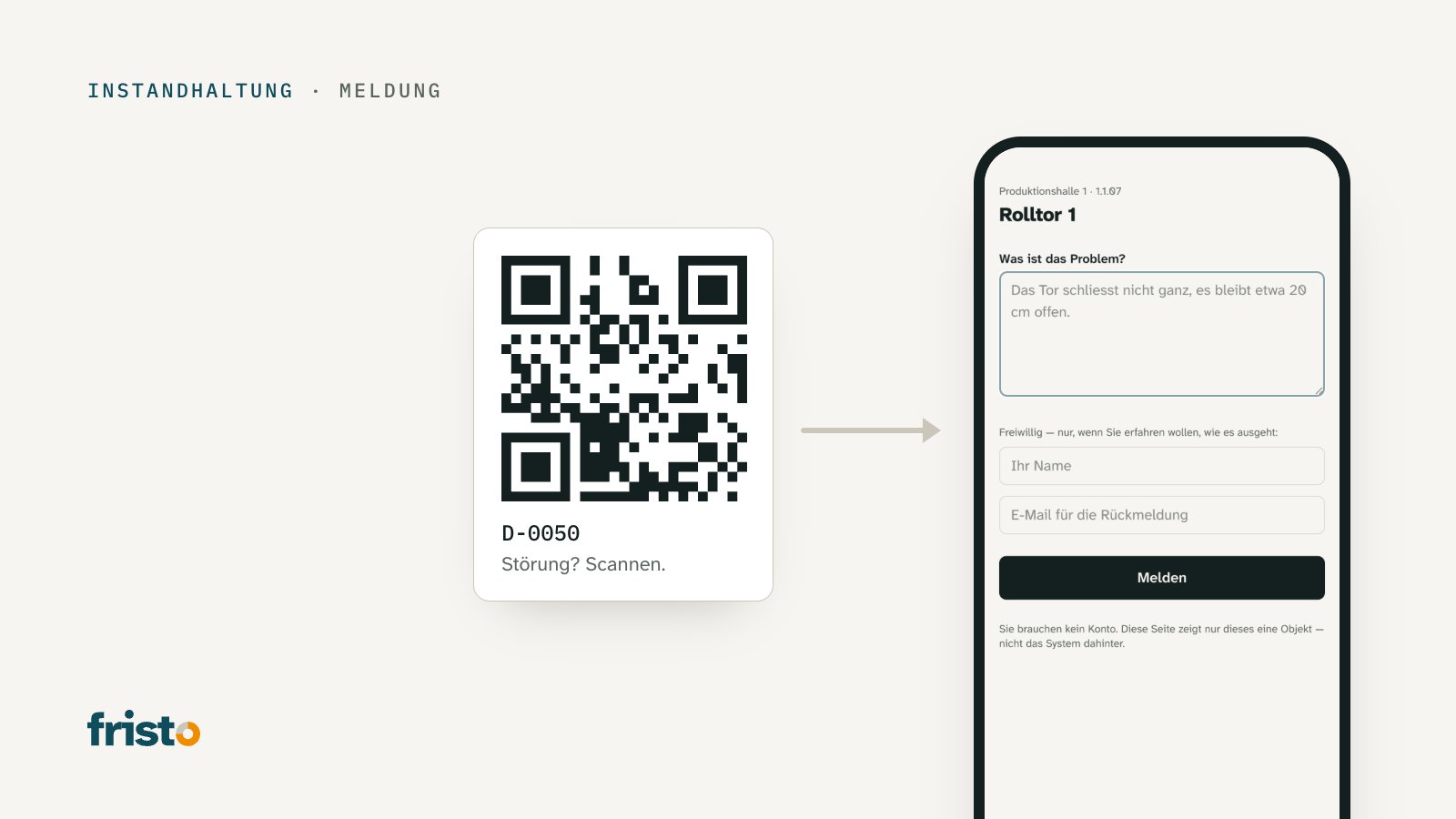
The roller door in Hall 1 hasn't closed fully for days; it stays open by about twenty centimetres. Plenty of people have seen it: the forklift driver, the woman from the shipping department, a driver who makes a delivery every morning. Nobody has reported it. Everyone assumed the caretaker had known about it for ages. The caretaker finds out in November, when the wind drives snow into the hall.
Faults seldom go unreported because nobody notices them. They go unreported because reporting is more of a hassle than looking away: Whom do you call? What is the equipment called? Does it need a form, an account, a password?
This article shows why the barrier to reporting must be zero, how reporting by QR code works and what has to happen for a report to become a completed work order.
Whoever spots a fault rarely has an account
The people who see a facility every day are rarely the ones who manage it. Production staff, tenants, cleaning staff, visitors, suppliers — they stand in front of the dripping tap or the flickering emergency light, but they have no access to a maintenance system and no reason to set one up.
Yet the law expects a report from many of them. An employee who identifies a defect that impairs occupational safety and cannot remedy it themselves must report it to the employer without delay (VUV Art. 11). Tenants report defects that they are not required to remedy themselves to the landlord (OR Art. 257g). And anyone who uses an electrical installation belonging to someone else reports any defects found to the owner (NIV Art. 5). An organisation that genuinely wants to receive these reports must make it easy for people to make them.
Why the barrier must be zero
Every additional step costs reports. A telephone number that first has to be looked up, a form with twelve mandatory fields, a login with a password — at each of these points, someone who actually wanted to help gives up. What is left are the reports from the persistent and the faults that are so big that they can no longer be overlooked.
In practical terms, a low barrier means:
- No account: Anyone standing in front of the equipment can report. The sticker on the equipment is proof enough that the person is on site.
- No location details: The code knows which item of equipment is concerned, in which building and in which room. Nobody has to type out “Roller door 1, Hall 1, upper floor”.
- One field: What is the problem? Two sentences are enough.
- Contact optional: Anyone who wants to know how it turns out leaves an email address. Anyone who doesn't reports anonymously.
What is deliberately missing is the question of urgency. It is better judged by the person who knows the operation than by someone who happens to pass by: to a visitor every dripping pipe looks urgent, while an inconspicuous emergency light that isn't working goes unnoticed. An “urgent” category in the reporting form soon means that everything is urgent.
How reporting by QR code works
A QR code is stuck on each item of equipment, leading to a reporting page for precisely that equipment. The person scans it with their phone's camera, sees the name of the equipment and writes what is wrong. One button, done.
Two points decide whether this works in everyday use:
- The reporting page shows only this one item of equipment. Anyone who photographs a sticker gains no insight into the system behind it — no list, no other buildings, no names.
- The sticker lasts. An office sticker is illegible in an underground car park after one winter. Harsh environments call for film with UV protection or an aluminium sign.
From report to work order
A report is not yet a work order. Between the two lies a decision, and it must be made by a person who knows the operation. A fixed process has proved its worth:
- Review: New reports land in a place that the responsible person sees every day — not in a personal inbox.
- Decide: Does it become a work order? Or is it not a defect, already known, or someone else's responsibility? In that case the report is rejected with a short reason that the person who reported it can read.
- Classify: The work order is assigned a trade, an urgency and a responsible party — a person, a group or an external company.
- Set a deadline: The urgency determines a response deadline and a completion deadline. It makes sense to calculate in working time: If someone is given a deadline of four working hours at 16:30 on a Friday, and working hours are 07:00 to 17:00, they must respond by Monday at 10:30, not by Friday evening at 20:30.
- Feed back: Anyone who left an address learns that the report has been received, and later that it has been completed — or why not.
The last step is often forgotten, and it is precisely this one that determines the next report. Someone who has reported once and never hears anything back won't report next time.
Involving external companies
Many faults are fixed not by your own staff but by a company: the door service, the electrician, the ventilation firm. The low barrier applies here too. The company needs no account of its own in the organisation's system, just a link to its work order. Through it, it accepts or declines, reports when it will come, and closes the work order with a date, a comment and a report. The organisation checks the result and signs off the work order — only then is it complete.
How reports, work orders and inspection obligations are connected in one system is described on the page What is CAFM?
Rule of thumb: A fault that nobody reports does not exist for the organisation. Make reporting easier than looking away — and reply to everyone who has reported.
The references to regulations in this article are general information and do not constitute legal advice. In individual cases, the regulations of the canton and the requirements of the competent authority apply.
How Fristo helps
In Fristo, every item of equipment gets a QR sticker; the QR sheet for printing is generated in the application. Reports are made without an account using one text field; name and email are optional. New reports appear under the work orders for review, and with “Create work order” or “Reject” you decide what happens; Fristo calculates the deadlines in the working calendar with the public holidays of your canton.
Sources
- Verordnung über die Verhütung von Unfällen und Berufskrankheiten (VUV), SR 832.30, Art. 11 — Bundeskanzlei, Fedlex: fedlex.admin.ch/eli/cc/1983/1968_1968_1968/de
- Obligationenrecht (OR), SR 220, Art. 257g — Bundeskanzlei, Fedlex: fedlex.admin.ch/eli/cc/27/317_321_377/de
- Verordnung über elektrische Niederspannungsinstallationen (NIV), SR 734.27, Art. 5 — Bundeskanzlei, Fedlex: fedlex.admin.ch/eli/cc/2002/22/de